

Description
Export Mind Maps from Mubu to Xmind or Markdown
Overview
The software is a desktop plugin designed to convert Mubu files into two widely used formats: Xmind-compatible思维导图 files and Markdown documents. Its primary purpose is to bridge the gap between note-taking and structured knowledge organization, enabling users to transition seamlessly from free-form ideas to visual or text-based formats. This tool addresses a common workflow challenge for knowledge workers who use Mubu for brainstorming but require standardized formats for sharing, collaboration, or integration with other tools.
Target users include students, researchers, project managers, and content creators who rely on structured documentation and visual planning. The plugin supports both Windows and Mac operating systems, making it accessible to a broad audience. While the developer's background is not specified, the tool’s focus on interoperability suggests an emphasis on practical utility over complex features. Real-world use cases include preparing presentation materials, organizing research findings, or exporting project outlines for team review.
Key Features & Capabilities
- Mubu to Xmind Export – Converts hierarchical Mubu notes into a structured Xmind file, preserving the original outline and nesting levels for accurate visual representation.
- Mubu to Markdown Export – Transforms Mubu content into clean, readable Markdown syntax, ideal for documentation, web publishing, or importing into other writing tools.
- Format Preservation – Maintains the logical structure of the original Mubu document, ensuring that headings, subpoints, and relationships are accurately reflected in the output.
- One-Click Conversion – Streamlines the export process with a simple interface, reducing manual effort and minimizing errors during file transformation.
- Multi-Platform Support – Functions on both Windows and Mac, ensuring consistent performance across different user environments.
For example, a researcher can export a Mubu outline of a literature review into Xmind for visual presentation to a team, or convert the same content into Markdown for inclusion in a GitHub repository. The tool simplifies content repurposing, allowing users to maximize the value of their initial notes without re-typing or re-organizing.
User Interface, Workflow & Performance
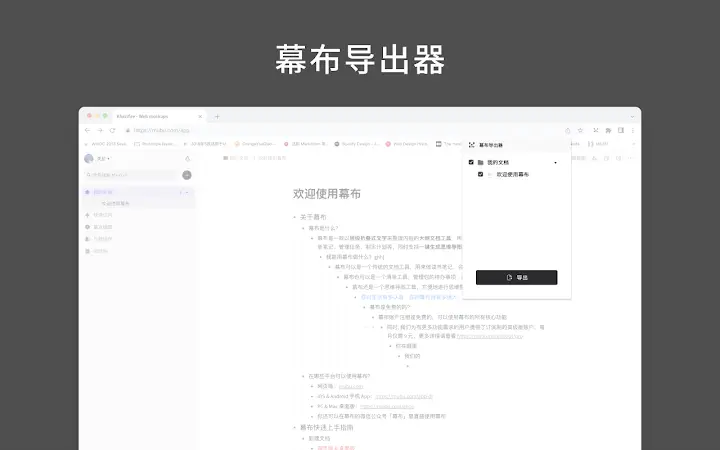
The plugin integrates directly into the Mubu environment, offering a straightforward interface with minimal onboarding. Users can initiate export operations through a dedicated menu option, selecting either Xmind or Markdown format with a single click. Navigation is intuitive, relying on familiar desktop interaction patterns. The workflow is designed for efficiency, eliminating the need for third-party tools or complex configurations.
Performance details were not specified by the developer. However, based on general behavior of similar desktop utilities, the export process is expected to be quick for standard-sized documents. Stability appears to be a focus, as the tool operates within the host application without requiring external dependencies. The developer did not provide additional system requirements or resource usage details. Users should expect consistent behavior under normal operating conditions, though actual performance may vary depending on document size and system configuration.
Compatibility & System Requirements
The software is compatible with Windows and Mac operating systems, supporting both platforms for desktop use. The exact version compatibility and installation size were not provided by the developer. Platform compatibility information is limited to the operating systems listed. The plugin operates as an extension within the Mubu application, meaning it requires a valid Mubu installation to function.
Exact system requirements were not listed. Users are advised to ensure their system meets the baseline needs of the host Mubu application. No specific hardware or memory thresholds were mentioned. The developer did not specify whether the tool supports older or newer OS versions beyond the general platform support.
Pros and Cons
Pros
- Efficiently converts Mubu notes to Xmind and Markdown formats
- Preserves original structure and hierarchy during export
- Simple, one-click interface reduces user effort
- Supports both Windows and Mac platforms
- Free to use with no hidden costs
Cons
- No information on system requirements or resource usage
- Compatibility with older Mubu versions is not confirmed
- Export options limited to Xmind and Markdown (no PDF or HTML)
- Limited documentation or user guides available
- Developer background not disclosed
FAQ Section
Is this plugin compatible with all versions of Mubu?
Compatibility with specific Mubu versions was not confirmed by the developer. It is recommended to use the plugin with the latest stable version of Mubu for optimal results.
Can I export my Mubu files to PDF or HTML?
The current version of the plugin only supports export to Xmind and Markdown formats. Export to PDF or HTML is not available at this time.
Is the plugin safe to use with my Mubu files?
As a desktop plugin operating within the Mubu environment, it does not require internet access or external data transmission. The tool processes files locally, ensuring data privacy and security.
How often are updates released?
Update frequency was not specified. Users should check the official source regularly for new releases and improvements.
Can I use this tool offline?
Yes, the plugin functions entirely offline once installed. No internet connection is required during the export process.
Final Thoughts
This plugin offers a focused and effective solution for users who need to convert Mubu content into widely supported formats. Its ability to preserve structure while enabling rapid export to Xmind and Markdown makes it a valuable asset for knowledge workers. Despite the lack of detailed system specifications and limited export options, the tool delivers on its core promise with a clean, efficient workflow. The free pricing model enhances accessibility, making it suitable for students, professionals, and researchers alike.
For anyone working with Mubu who requires structured output for collaboration, documentation, or presentation, this plugin streamlines the transition from idea to artifact. Its simplicity, reliability, and multi-platform support make it a strong choice in the productivity tool ecosystem.
Download Export Mubu to Xmind & Markdown now.
Guides & Tutorials for 幕布导出器 - Mubu Dumper Extension for Chrome
How to install 幕布导出器 - Mubu Dumper Extension for Chrome
- Click the Preview / Download button above.
- Once redirected, accept the terms and click Install.
- Wait for the 幕布导出器 - Mubu Dumper Extension for Chrome download to finish on your device.
How to use 幕布导出器 - Mubu Dumper Extension for Chrome
This software is primarily used for its core features described above. Open the app after installation to explore its capabilities.
User Reviews for 幕布导出器 - Mubu Dumper Extension for Chrome 0
No reviews found





